
LogoAIDirs
  • Category
  • Tag
  • Collection
  • Blog
  • Pricing
  • Cli Docs
LogoAIDirs
LogoAIDirs

Discover the top AI tools of 2026 with the AiDirs.org AI Directory!

GitHub
Built withLogoMkdirs
Product
  • Search
  • Collection
  • Category
  • Tag
Resources
  • Blog
  • Pricing
Company
  • About Us
  • Privacy Policy
  • Terms of Service
  • Sitemap
Friends
  • Prompt Cat
Copyright © 2026 All Rights Reserved.
  1. Home
  2. Category
  3. Next Enhancer AI
icon of Next Enhancer AI

Next Enhancer AI

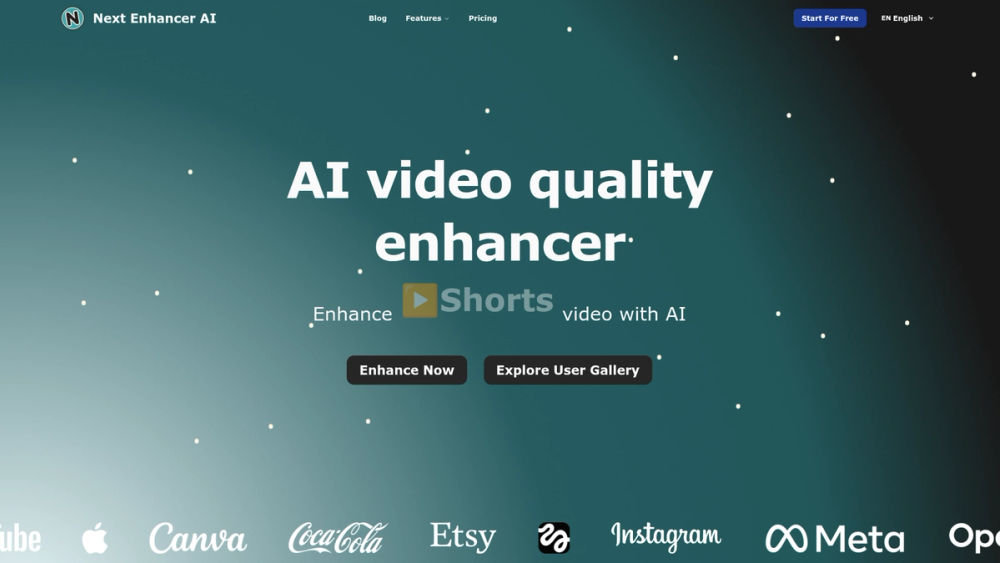
AI-powered online video enhancer and upscaler—convert old videos to HD/4K with multi-format support, one-click processing, and browser-based workflow.

Visit Website
image of Next Enhancer AI
Visit Website

Next Enhancer AI

Next Enhancer AI is a browser-based, AI-driven video enhancement and upscaling service designed to convert low-quality or old footage into higher-resolution, visually improved HD and 4K videos.

Key Features

  • One-click AI enhancement and upscaling to 1080p, 2K, 4K, or 8K.
  • Multi-format input support: MP4, FLV, HLS, MXF, MOV, TS, WEBM, MKV.
  • Drag-and-drop upload with in-browser controls and an output preview pane.
  • File limits and technical constraints clearly surfaced: Max 500MB, Max 300 seconds, ≤60 FPS.
  • Credit-based processing model (UI shows estimated credits required).
  • Upscale history and gallery with before/after slider previews for examples and portfolio.
  • No client software required — fully online processing.

Technical Notes

  • Upscaling uses AI-based models (denoising, detail synthesis, and color restoration) to reconstruct higher-resolution frames and improve perceived sharpness.
  • Supports multiple target resolutions and selects algorithmic trade-offs for speed vs. quality.
  • Browser-side drag-and-drop with server-side processing for compute-heavy tasks.
  • Designed to handle common video codecs and container formats; recommended to keep within upload limits for best throughput.

Typical Use Cases

  • Restoring archival and home videos to HD/4K for preservation or re-release.
  • Improving social media clips and vertical/portrait videos for modern platforms.
  • Content creators repurposing legacy footage for monetized channels (YouTube, TikTok, Instagram).
  • Marketers and agencies preparing higher-quality ads and product videos from older assets.

Target Users

  • Hobbyists and home archivists restoring family or historical footage.
  • Video editors and creators who need fast upscaling without local GPU resources.
  • Marketing teams and social media managers seeking quick quality boosts for short clips.

Workflow Summary

  1. Upload or drag & drop a supported video (observe file and length limits).
  2. Choose target resolution (1080p / 2K / 4K / 8K).
  3. Submit for AI enhancement (system estimates required credits).
  4. Review upscaled output in the Upscaled Video pane and download the enhanced file.

Unique Selling Points

  • Fast, no-install web experience focused specifically on video upscaling and quality restoration.
  • Clear limitations and UI cues (credits, formats, file size) that streamline user expectations.
  • Visual gallery and before/after slider to demonstrate results and drive trust.

Practical Considerations

  • Large or very long videos may require splitting or pre-processing to meet upload limits.
  • Some artifacts may persist depending on source quality; AI models synthesize plausible detail but cannot perfectly recreate lost information.
  • Consider iterative runs or lower target frame rates for extremely noisy sources to balance speed and quality.

Use cases for Next Enhancer AI

  • People exploring AI Video Enhancer tools use Next Enhancer AI when comparing options in that category.
  • People exploring AI Video tools use Next Enhancer AI when comparing options in that category.
  • Next Enhancer AI is often considered alongside other Video to Video tools in this directory.

Frequently asked questions about Next Enhancer AI

Back
Information
  • Publisher
    liu Alexander
  • Websitenextenhancer.com
  • Published date2025/09/15
  • Last updated2025/09/15
Categories
  • AI Video Enhancer
  • AI Video
Tags
  • Video to Video
icon of ImgEnhancer
ImgEnhancer
Sponsored

Enhance image quality online with AI. Upload a photo to sharpen details, unblur images, upscale resolution, and download clearer results in seconds.

Related AI tools

icon of Seedance 2.5

Seedance 2.5

AI Video EnhancerAI Video

Seedance 2.5 is ByteDance's multimodal AI video generator for cinematic 30-second videos, with up to 50 reference elements, high-fidelity control, AI video editing, text-to-video, image-to-video, realistic motion, and 4K workflows.

Text to VideoImage to VideoVideo to Video
icon of   MiroFish

MiroFish

AI CourseAI Ad Creative AssistantAI App BuilderWriting AssistantsAI Analytics AssistantAI ImageAI TranslateAI Video EnhancerAI CodeAI StudyText to VideoLLMAI ArtPromptAI GameAI Grammar CheckerAI AgentAI PPTAI VideoAI CharacterAI APIAI DirectoryAI MusicAI TextAI QR CodeAI VoiceAI SEOAI Search EngineAI Chatbot

MiroFish turns prompts and documents into AI scenario graphs, multi-agent simulations, prediction reports, and follow-up chat for decision rehearsal.

AI AgentAI ChatAI CodingAI SearchFor Fun+9
icon of Seedance 2.5

Seedance 2.5

AI Video EnhancerText to VideoAI Video

Seedance 2.5 AI Video Generator | Text & Image to Video

Image to VideoText to VideoVideo to Video
icon of MaxArt.ai

MaxArt.ai

Text to VideoAI VideoAI Video Enhancer

AI Video Effects - Create Stunning Visuals Instantly | MaxArt.ai

Text to VideoVideo to VideoAI Agent
icon of HappyHorse

HappyHorse

AI VideoText to VideoAI ImageAI Video Enhancer

Multimodal AI video generator that turns text, images, and video references into short cinematic clips with camera motion control and sound.

Text to VideoImage to VideoVideo to Video
icon of Wan 2.7

Wan 2.7

Text to VideoAI VideoAI Video Enhancer

Wan 2.7 is an AI video generator for 2–15s 1080p clips with native audio sync, multi-reference input, and instruction-based editing.

Text to VideoImage to VideoVideo to Video