
LogoAIDirs
  • Category
  • Tag
  • Collection
  • Blog
  • Pricing
  • Cli Docs
LogoAIDirs
LogoAIDirs

Discover the top AI tools of 2026 with the AiDirs.org AI Directory!

GitHub
Built withLogoMkdirs
Product
  • Search
  • Collection
  • Category
  • Tag
Resources
  • Blog
  • Pricing
Company
  • About Us
  • Privacy Policy
  • Terms of Service
  • Sitemap
Friends
  • Prompt Cat
Copyright © 2026 All Rights Reserved.
  1. Home
  2. Category
  3. AI Image
  4. Picool
icon of Picool

Picool

An all-in-one image processing website that offers powerful online tools for editing, generating, and enhancing images — all in one place, no installation required.

Visit Website
image of Picool
Visit Website

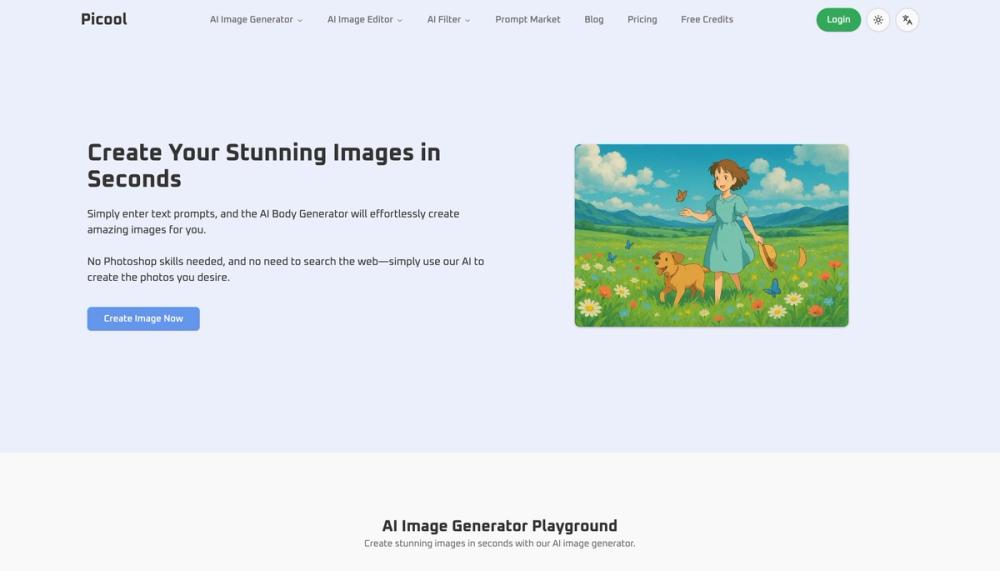
What is Picool Picool is a super easy-to-use AI tool. Here you will have Image to Image, Text to Image, Remove Background, Watermark Remover, Object Remover and AI FIlter functions, which can help you deal with most of the problems with pictures to a great extent, and use AI to make your pictures better. How to use Picool Just open picool.ai Then select the tool you want. There are various functions for processing pictures, which you can use. You should be as detailed as possible about your needs so that the Text to Image and Image to Image functions can play the greatest effect. Picool core features Image to Image: You can upload the image you want to edit and use picool's image to image function to modify your image, such as changing the style of your image or making adjustments to the details of the image. Text to Image: After using this function, you can generate any picture you want by entering your prompt words. The more detailed the prompt words are, the more the generated picture will meet your needs. Remove Background: Remove the background of your picture so that there is only you in your picture and remove various objects behind. Watermark Remover: Remove the watermark from your pictures, making your pictures cleaner and neater without being affected by the hateful watermarks. Object Remover: Using this function will be more convenient. You can use the brush to select what you want to remove, so that you can directly eliminate the selected object. Buzz Cut Filter: You will have AI FIlter functions to use, the first of which is this Buzz Cut Filter, which can help you easily change your hairstyle into a buzz cut. Advantages of Picool.ai: Efficiency: The speed of generating pictures is very fast, which can help you save time. Cost-effective: It can help you generate pictures of various styles without spending too much money. Versatility: It is rich in functions, not only does it have Image to Image function, but also various watermark removal functions. Easy to use: The web page UI is excellent, and the function distribution is very reasonable. You can find the function you want at a glance. Quality: The quality of the image after Image to Image is very high, and you can download it directly to your device for use. Secure: Data protection is very safe and will not leak your personal privacy. Use cases of Picool.ai: Picool.ai is an ideal choice for designers, marketers, content creators, and AI enthusiasts. You can use picool.ai to handle various image-related issues. The Image to Image function is very suitable for content creators. Even if you are just trying out the AI Image to Image function, you can use it at picool.ai.

Use cases for Picool

  • People exploring AI Image tools use Picool when comparing options in that category.
  • Picool is often considered alongside other Image to Image tools in this directory.
  • Picool is often considered alongside other Text to Image tools in this directory.

Frequently asked questions about Picool

Back
Information
  • Publisher
    xingliang1 z
  • Websitepicool.ai
  • Published date2025/07/02
  • Last updated2025/07/02
Categories
  • AI Image
Tags
  • Image to Image
  • Text to Image
icon of ImgEnhancer
ImgEnhancer
Sponsored

Enhance image quality online with AI. Upload a photo to sharpen details, unblur images, upscale resolution, and download clearer results in seconds.

Related AI tools

icon of Artcraft AI

Artcraft AI

AI ImageAI VideoAI Art

Artcraft AI is an online AI image and video studio: generate and edit images, turn photos into videos and edit clips by describing the change. Free to start.

Image to ImageImage to VideoText to ImageText to Video
icon of Soul Cinema

Soul Cinema

AI ImageAI ArtAI Character

Soul Cinema transforms written concepts into film-grade stills with consistent characters and high resolution.

Text to ImageImage to ImageFor Fun
icon of Dream Pixel AI

Dream Pixel AI

AI ImageAI ArtAI Text

Create stunning images using advanced AI for both personal and commercial use.

Text to ImageFor FunImage to Image
icon of GFX Forge

GFX Forge

AI ImageAI GameAI Ad Creative Assistant

Create Roblox thumbnails, GUIs, HUDs & icons with AI. Ready-made styles for Roblox, Minecraft, Unity & Fortnite. Prompt or reference image in, asset out.

Image to ImageAI AgentText to Image
icon of Make Image Clearer

Make Image Clearer

AI ImageAI Video EnhancerAI Art

Make Image Clearer is an online AI photo enhancer that fixes blurry, noisy, and low-resolution images in seconds. Upload a JPG, PNG, or WebP to sharpen details, reduce blur, restore old photos, and preview a clearer result—no software required.

Image to ImageText to Image
icon of   MiroFish

MiroFish

AI CourseAI Ad Creative AssistantAI App BuilderWriting AssistantsAI Analytics AssistantAI ImageAI TranslateAI Video EnhancerAI CodeAI StudyText to VideoLLMAI ArtPromptAI GameAI Grammar CheckerAI AgentAI PPTAI VideoAI CharacterAI APIAI DirectoryAI MusicAI TextAI QR CodeAI VoiceAI SEOAI Search EngineAI Chatbot

MiroFish turns prompts and documents into AI scenario graphs, multi-agent simulations, prediction reports, and follow-up chat for decision rehearsal.

AI AgentAI ChatAI CodingAI SearchFor Fun+9