
ImgPilot — Overview
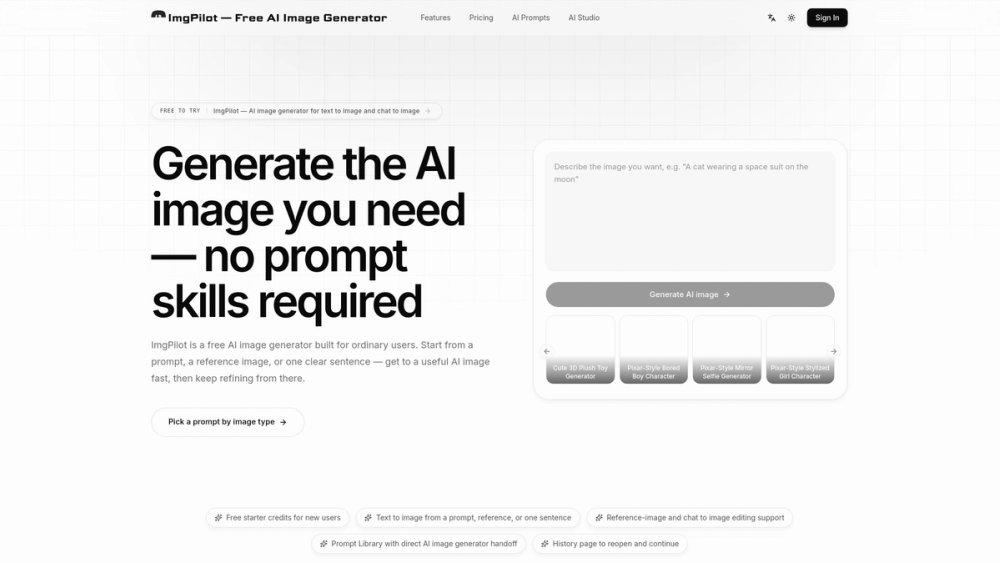
ImgPilot is a web-based AI image generator focused on accessibility and iterative editing for ordinary users and creators who want fast, useful images without learning complex prompt syntax.
Key features
- Text to image: Generate images from a single sentence or detailed prompt using selectable AI models and aspect ratios.
- Chat to image (iterative editing): Upload a reference image or start from a generated result, then refine the image through conversational instructions so each edit builds on the previous output.
- Prompt Library: Curated, ready-made prompts organized by image type with one-click handoff into the generator to help non-experts get high-quality results quickly.
- Credits-based pricing: Free starter credits for new users and monthly plans (Basic, Pro, Ultra) offering different credit bundles, higher resolutions (up to 4K), and longer or permanent history.
- Generation history and replay: Reopen past generations and continue editing instead of starting from scratch.
- Multiple output resolutions and formats: Standard (1K), high (up to 2K), and max (up to 4K) depending on plan.
Technical highlights
- Model selection and format controls let users trade off speed, fidelity, and resolution for their use case.
- Chat-driven editing retains state between rounds so subsequent transformations operate on the previous image rather than regenerating from prompt only.
- Credits system simplifies cost control: each generation or edit consumes credits defined by resolution and model.
- Clean, responsive UI with an image carousel, prompt library integration, and clear CTA paths for generator, chat editing, and prompt browsing.
Primary users and use cases
- Individual creators and hobbyists wanting quick illustrations, avatars, or social media images.
- Marketers and designers who need concept variants or rapid mockups without deep prompt engineering skills.
- Educators and students creating visuals for lessons and projects using simple language prompts.
- Teams exploring iterative image editing workflows via chat-based instructions and reference images.
Why choose ImgPilot
- Low barrier to entry: 50 free credits and curated prompts make it easy to get a useful result without studying prompt syntax.
- Iterative and non-destructive editing: chat-to-image streamlines progressive refinement and reduces wasted generations.
- Flexible plans: scalable credits and resolution options to match occasional or heavy usage.
Practical workflow example
- Type a one-sentence description or pick a prompt from the Prompt Library.
- Choose a model, aspect ratio, and resolution.
- Generate the first draft, then request targeted edits via chat (e.g., "make the background sunset, remove the logo, add a superhero cape").
- Download or continue refining; history lets you revert or continue prior edits.
Security & privacy notes
- Cookie consent is presented in a dismissible banner; privacy and terms links are available in the footer.


